For countless years, the concept of productivity has been about using many different applications all in one. People have to use different devices and software which help them do specific things, but these applications cannot exchange data effortlessly and require some machines to be used on one’s behalf. Earlier, any project required some machine processing, but nowadays, it is time to redefine these structures.The advent of AI agents brought new perspectives on the use of AI-based applications to fulfil many tasks connected with productivity.
They are unlike traditional chatbots, which can only help with communication. These intelligent agents can hold complex conversations, connect with other applications, and exchange information in different forms, including actions. One of the latest articles issued by Microsoft describes the latest trends proven by the new fact, which is that agents can execute different actions automatically rather than just help people communicate.
Is it possible to replace the entire productive system with AI agents for 30 days?
No, the replacement will not cost the users anything. The idea is to experiment with AI application features and ways to speed up processes.
How is an AI-Agent Productivity Stack Structured?
A typical productivity stack may have the following:
Email for messaging
Calendar for meetings
Task manager for deadlines
Notes for ideas
Cloud storage for data
Project management software
Research tools
The issue with this is that the tools work separately.
An email arrives. The user decides whether a task is involved. If the user decides there is, they input the task manually and may add a calendar reminder. After the meeting, the user goes over the notes, identifies the tasks, and enters them in the project management software.
The person is the integration level.
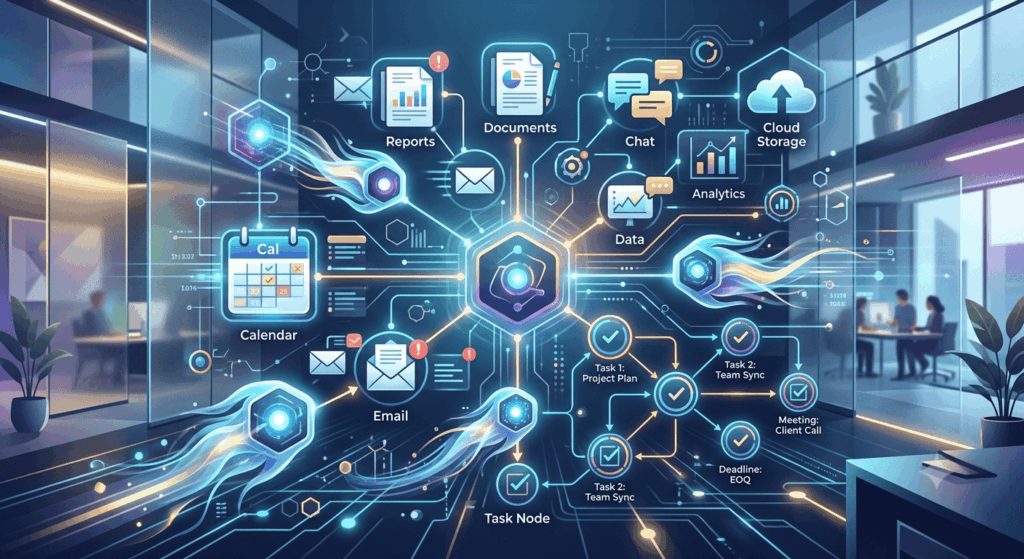
Artificial intelligence agents provide a different concept.
Rather than ordering AI to shorten a certain email, a user may instruct an agent to analyse crucial correspondence, check for deadlines, add them to the calendar, and perform the necessary actions connected to them.
The essence of this transformation is:
Traditional productivity: human → application → action
Agentic productivity: human → purpose → agent → several actions
The importance of this difference is constantly growing with the agents’ ability to function across various applications.
Week One: Learning to Delegate
During the initial week, users find that it is not as exciting as it seems. Humans, by nature, are creatures of habit and regularly find themselves opening their email, checking their calendars, and creating tasks. The most important lesson here is that AI agents require contextual information. An agent that just knows the user’s current request cannot grasp the amount of work that has to be done, but someone who is connected to emails, documents, calendars, and project details will be able to realise task priorities.
The concept of the “agent-boss,” introduced by a study by Microsoft in 2025, suggests learning how to manage AI assistants. This means that productivity skills are not going to disappear but, instead, transform. Therefore, instead of just learning how to work with programs, employees are going to learn how to set goals and delegate tasks.
Context is the New Coin of Productivity
Imagine the case of an employee asking:
“Which tasks should I tackle today?”
An ordinary chatbot can probably give a decent answer.
However, a smart agent that has access to the employee’s workplace may offer:
-
Deadlines to come
-
Hot emails
-
Meeting obligations
-
Pending jobs
-
Project updates in real time
-
Documents due for reading
-
Unanswered messages
In fact, the more relevant the context, the better the suggestion provided by the agent.
Week Two: Getting Emails to Work
Email is a great example of possibilities involving agents.
Instead of sending emails one at a time, an agent processes emails by defining their importance and spotting those emails that require action.
Email can sort incoming emails into:
-
Immediate decisions
-
Needing responses
-
Deadlines
-
For information only
-
Project-related emails
-
Emails that can wait
This does not mean that an email agent should automatically reply to all emails.
The main benefit associated with this technology is reducing the number of times an employee enters the inbox.
Research done by Microsoft in relation to the issue of the infinite working day proves that employees are already dealing with a considerable number of emails in the workplace, with some people arriving early at work to organise their emails.
Transforming Inbox Management into Information Management
The ideal agent may not be the fastest email writer. The perfect agent helps identify which emails warrant being opened.
This is important because even though it might take only a couple of minutes to reply to an email, determining whether the message is important takes longer.
AI can take care of the initial steps of the triaging process, leaving the decision-making process to humans.
Week Three: Calendar and Tasks Become One System
The third week is the time when making use of both the calendar and the task manager becomes possible, as they form one system.
A calendar gives the user a date of an event that will take place.
A task manager specifies the actions that must be carried out.
An AI agent can combine these two functions.
Let’s say that you have twenty tasks but only three hours available to do them. The agent can decide which tasks to perform and in what order, based on the deadlines and priorities connected with the tasks in your schedule, and recommend a detailed plan of action.
The question changes from:
“Where should I start?”
to:
“What will I do next?”
This question is far more significant in terms of productivity.
The Agent Turns into a Workload Supervisor
Think of a report that is due Friday.
An agent might see that research has not yet started, find appropriate documents, summarise the work done previously, create the outline and make time suggestions for completing the report.
The employee still has to make the final decision about whether the plan is good.
But at least, the administrative overhead is lowered.
Microsoft’s 2026 Work Trend Index suggests that as more execution is done by AI, humans can spend more time managing work and taking responsibility for results.
This can become one of the most significant changes in knowledge work.
Week Four: Assistant to Digital Chief of Staff Transition
The most significant change by the fourth week may be the introduction of the delegation process.
Instead of providing agents with multiple small instructions, users can now begin to communicate their desired results.
Traditional Workflow
1: Get industry news
2: Read
3: Identify key facts
4: Summarise
5: Structure
6: Create the briefing
Agent Workflow
The agent gives instructions to execute the user’s requirements.
These are the facts about agentic AI technology, which is found everywhere in the modern world.
According to Anthropic (the company creating this advanced AI technology), AI agents are modern systems that are able to program, organise files, and perform multiple tasks for their users, therefore stating that more freedom means greater dangers.
What Actually Gets Better After 30 Days
The largest improvement does not necessarily arise from amazing automation.
Instead, it arises from getting rid of hundreds of daily interruptions.
Less Context Checking
Switching from e-mails to documents, multiple calendars, task managers, and back distracts the person. An agent can become a coordinating layer between these systems. Instead of opening five applications, the person can ask one system to get everything done.
Faster Research
AI agents collect information, compare sources, and organise results. It is especially helpful for writers, marketers, analysts, and researchers. The less time a person spends looking for information, the more time he or she spends on evaluation.
Better Meeting Follow-up
Meetings create tons of paperwork.AI meeting tools are able to record conversations, summarise a meeting, and present action points.
Granola is becoming better known for meeting notes and summaries created by AI. Its founder, Chris Pedregal, tells us that AI should learn to understand the context of a user, rather than just provide a bigger output.
How the process looks:
Meeting → Summary → Decisions → Task → Calendar
What is described is the workflow that an agent is intended for.
Reduced Oversight of Responsibilities
Individuals tend to neglect minor pledges hidden among their discussions. A machine can pinpoint phrases like “I will deliver this on Thursday” and generate an email reminder. This leads to a shift from a passive approach to a more active one in terms of productivity.
Example from the real world: Goldman Sachs
The changes are already being introduced in large corporations.
Goldman Sachs is helping AI agents to function more like experienced employees, as it incorporates the company standards, past knowledge and internal processes into the AI.
The latest news has it that over 12,000 developers at Goldman use cutting-edge agent tools, while the financial institution is elaborating on its reusable skills that would be used by agents.
The key takeaway is that the effectiveness of an agent is not determined by the model alone.
The agent’s usefulness considerably increases when he/she learns the processes and standards of the company he/she is working in.
The Main Issue: AI Generates More Work
There is something to note: AI systems do not mean a lessened need for management. Sometimes they require an upsizing of management. An AI system may not accomplish an assignment properly, not comply with instructions, or make a poor choice. That result needs to be checked by someone. The equation may then be understood as follows:
Time saved due to automation minus time spent supervising equals productivity. If 1 hour is saved by an AI agent but it needs 45 minutes of checking, productivity does not increase.
The news also depicts the problem of over-automation. Many startup founders stated that they are spending more time working to control their intelligent assistants. The paradox is amazing.
An Expert Perspective: Governance is Needed for Autonomy
Anthropic’s study regarding trustworthy agents found that with autonomy comes the problem of agents being able to act without being overseen by humans. This is how errors and security issues arise, such as prompt injection.
It means that just because the agents are capable of utilising something, they cannot have unlimited power as a result.
An organised productivity model can differentiate tasks according to their level of risk.
Low-risk
-
Makes summaries of documents
-
Organizes notes
-
Writes drafts of tasks
-
Does research
Medium-risk
-
Schedules meetings
-
Edits documents
-
Prepares responses to emails
-
Updates project information
High-risk
-
Sends sensitive emails
-
Shares confidential information
-
Makes financial decisions
-
Deletes important files
The higher the stakes, the more necessary it is to get approval from a human.
The Privacy Dilemma
Substituting conventional productivity tools with intelligent assistants means empowering them with more information.
An intelligent assistant has access to emails, documents, calendars, contacts and confidential information of the company.
That results in a substantially wider security risk than a simple chatbot.
Thus, the most optimal approach is to restrict access as much as possible.
An intelligent assistant should only be allowed to access information it needs for performing the tasks assigned to it.
It should also be evident when the assistant takes an action, what specific modifications it makes and what is not done without human approval.
What Can be Discovered from the 30-Day Analysis?
After one month has passed, the most important thing to learn is not that outdated productivity applications. It really tells us that the application-centric productivity model is becoming outdated.
-
People do not want an email application.
-
They do want to manage their communication.
-
They do not necessarily need to have a task manager.
-
What they actually wish for is to complete their important work.
-
People do not want to see a filled calendar.
-
They do want to make sure their time is arranged according to the priorities that are really important for them.
-
AI technology will bring software closer to that goal.
According to the latest research from Microsoft, this is part of a shift towards more human-agent collaboration.
AI Agents Will Not Replace Productivity Skills—If Anything, They Might Make Some Skills Even More Necessary.
Employees will have to improve their skills in:
– Setting objectives
– Establishing priorities
– Providing context
– Reviewing AI-created outputs
– Fact-checking
– Developing processes
– Managing permissions
– Making choices
Another relevant study of the use of AI in the workplace shows that the success of AI technology has a lot to do with humans’ active involvement in the process. Indeed, the researchers proved that while AI usage improves productivity, the outcome largely depends on how well humans combine their efforts with the use of AI.
The message is clear: Do not hope to avoid judgment just because tasks can be delegated to AI.
Conclusion
Productivity shifts away from being an issue of doing things in the best way possible. Simply substituting a whole productivity stack with AI agents for 30 days does not amount to clearing all the systems. The outlook that seems more realistic, however, is different.
The infrastructure will still include emails, calendars, documents, databases, and project management systems.AI agents will take on the role of a coordination layer over the infrastructure. So the most likely picture of the future productivity stack could look as follows:
Human + AI Agent + Connected Tools
The applications will probably not disappear.
Instead, they become less perceptible.
The agent takes on the function of the interface between intention and execution.
The most advanced system of productivity would not be the one that performs all the tasks itself, but the system that understands what to automate, what to check, and when to get a human involved.
After 30 days, the biggest change in productivity does not necessarily lie in producing more, but in focusing less on the tools of work and more on the actual work itself.
Frequently asked questions
What is an AI-Agent Productivity Stack?
A typical productivity stack includes email, calendar, task manager, notes, cloud storage, and project management software, but AI agents integrate these functions.
How do AI agents improve email management?
AI agents can process emails by defining their importance and sorting them into categories, helping reduce the time spent managing emails.
What significant change occurs by the fourth week of using AI agents?
Users begin to communicate their desired results instead of providing multiple small instructions, enhancing the delegation process.