

What is Hugging Face?
Think of Hugging Face as the world’s largest library for artificial intelligence tools, but instead of books, it contains powerful AI models that can understand and generate human language, recognize images, and perform countless other intelligent tasks.
The “GitHub of Machine Learning” Just like GitHub allows programmers to share their code with the world, Hugging Face allows AI researchers and developers to share their trained AI models. Imagine if every time someone created a brilliant AI tool, they put it in a public library where anyone could borrow it for free – that’s essentially what Hugging Face is.
A Simple Beginning with a Big Mission Founded in 2016 by French entrepreneurs Clément Delangue, Julien Chaumond, and Thomas Wolf, Hugging Face started as a chatbot company but evolved into something much more significant. Their mission is simple yet powerful: to democratize artificial intelligence. This means making AI tools available to everyone, not just big tech companies with massive budgets.
The Numbers Tell the Story Hugging Face hosts over 1 million models, datasets, and applications, making it the largest repository of AI tools in the world. To put this in perspective, that’s like having a million different AI specialists, each trained for specific tasks, all available at your fingertips. The platform has grown from a small startup to a $4.5 billion company by 2023, showing just how valuable accessible AI has become.
Why Hugging Face Matters
Breaking Down AI Barriers Traditionally, using AI required a team of PhD-level researchers, months of training time, and computers costing hundreds of thousands of dollars. Hugging Face changed this by providing pre-trained models – think of them as AI tools that have already learned their skills and are ready to work immediately.
The Power of Community Instead of every company creating AI from scratch, Hugging Face created a community where improvements benefit everyone. When Google creates a better language model, or when researchers at universities develop new techniques, they can share these on Hugging Face for the entire world to use and improve upon.
Plug-and-Play AI Hugging Face models work like apps on your smartphone – they’re designed to integrate easily with existing software. Whether you’re building a website, mobile app, or business system, you can add AI capabilities without starting from zero.
Accelerating Innovation By making AI accessible, Hugging Face has enabled small startups, individual developers, and even students to build applications that would have previously required Silicon Valley-sized budgets. This has accelerated AI adoption across industries from healthcare to education to entertainment.
Top 5 Hugging Face Models for the Month of September 2025
Let’s dive into some of the AI models that are shaping the future, from generating stunning images to powering a new generation of chatbots.
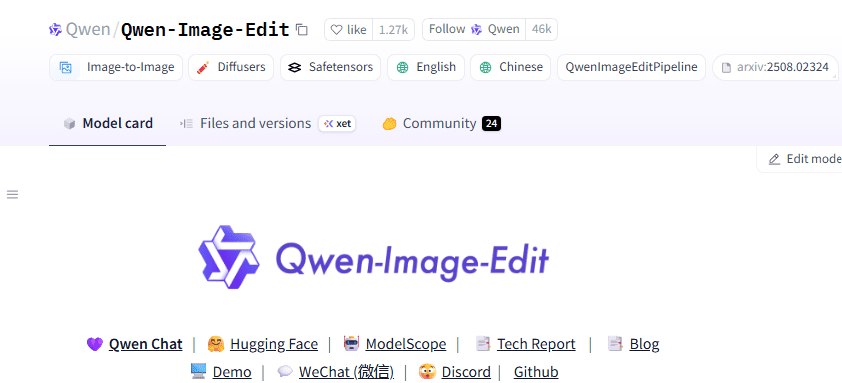
- Model Name and Developer: Qwen-Image-Edit, developed by Alibaba’s Qwen Team.
- What It Does (The Simple Explanation): Imagine an AI that is a master digital artist. Unlike a traditional image editor that requires you to manually draw and click, Qwen-Image-Edit uses your words to change a picture. You can tell it to “add a cat wearing a hat,” and it will intelligently place the cat in the image. This model is especially good at a tricky task: editing or adding text to images while making it look natural and perfect.
- Real-World Use Cases: This model is used for everything from creating marketing materials where you need to quickly change text on a poster, to creating custom digital art without needing to be an expert in graphic design. It’s revolutionizing how people edit photos for social media and business.
- Benefits & Advantages: The biggest advantage is its ability to understand natural language instructions, turning complex editing tasks into simple commands. Its text rendering capability is a significant leap forward, making it a great tool for a wide range of creative and commercial projects.
- Limitations & Things to Consider: Like many creative AI tools, it can sometimes produce unexpected or strange results, and it requires a significant amount of computing power to run, so it’s not something you can easily use on an old laptop.
- Model Name and Developer: DeepSeek-V3.1-Base, created by the Chinese AI company, DeepSeek.
- What It Does (The Simple Explanation): Think of DeepSeek-V3.1-Base as a highly specialized expert who is great at solving tricky problems. It has a unique “hybrid thinking mode” that allows it to either give you a quick, direct answer or take a moment to “think” through a problem step-by-step before responding. This makes it incredibly efficient and accurate, especially for tasks that require logic and reasoning.
- Real-World Use Cases: This model is a go-to for tasks that need high-level reasoning, such as writing and debugging complex computer code, solving mathematical problems, and acting as an intelligent agent that can use other tools to get a job done. It’s helping to power a new generation of smart assistants for developers and researchers.
- Benefits & Advantages: Its ability to “think” makes it exceptionally powerful for complex tasks, often outperforming other models of a similar size. The model’s efficiency is also a major plus, as it can deliver high-quality results without requiring as much computational horsepower as some of the larger models.
- Limitations & Things to Consider: While its reasoning is top-notch, its unique architecture and special features mean it can be a bit more complicated for a beginner to get started with compared to other, more traditional models.

- Model Name and Developer: Gemma-3-270m, developed by Google.
- What It Does (The Simple Explanation): If you needed a powerful AI that could fit on a small device, Gemma-3-270m would be your choice. It’s a surprisingly capable language model that’s incredibly efficient. While it can’t do everything, it is specifically designed to run on smaller devices like laptops, mobile phones, or even special hardware with limited resources.
- Real-World Use Cases: It’s perfect for building apps where you want AI to run directly on the device, such as a note-taking app that can summarize your thoughts, or a smart keyboard that offers more intelligent auto-correct and text suggestions. Its small size makes it ideal for democratizing AI and getting it into more people’s hands.
- Benefits & Advantages: The primary benefit is its tiny footprint and high efficiency. It allows developers to build AI applications that don’t need a constant internet connection or a large server, which is a major advantage for both cost and privacy. It is also multilingual, supporting a wide range of languages.
- Limitations & Things to Consider: As a smaller model, it won’t be as “smart” or have the same depth of knowledge as much larger models. It’s best used for specific tasks where its compact size and speed are more important than complex reasoning.
- Model Name and Developer: Seed-OSS-36B-Instruct, developed by ByteDance.
- What It Does (The Simple Explanation): This model is a master of memory. Most AI models can only remember and work with a limited amount of text at a time, but Seed-OSS-36B-Instruct can handle incredibly long conversations or documents. It can take in a massive amount of information at once, like an entire book or a long transcript, and then reason about it to provide detailed answers.
- Real-World Use Cases: This is a game-changer for tasks like legal document analysis, summarizing entire research papers, or building AI assistants that can recall details from very long-form conversations. It’s used in industries that rely on sifting through vast amounts of text.
- Benefits & Advantages: Its main advantage is its “native long context” capability. This means it was trained from the ground up to handle long documents, which makes it far better at this task than other models that have been retrofitted for it.
- Limitations & Things to Consider: As a large model, it requires substantial computing power, so it’s not a model you’d run on a standard personal computer. Its sheer size means it’s best suited for professional developers with access to powerful hardware.
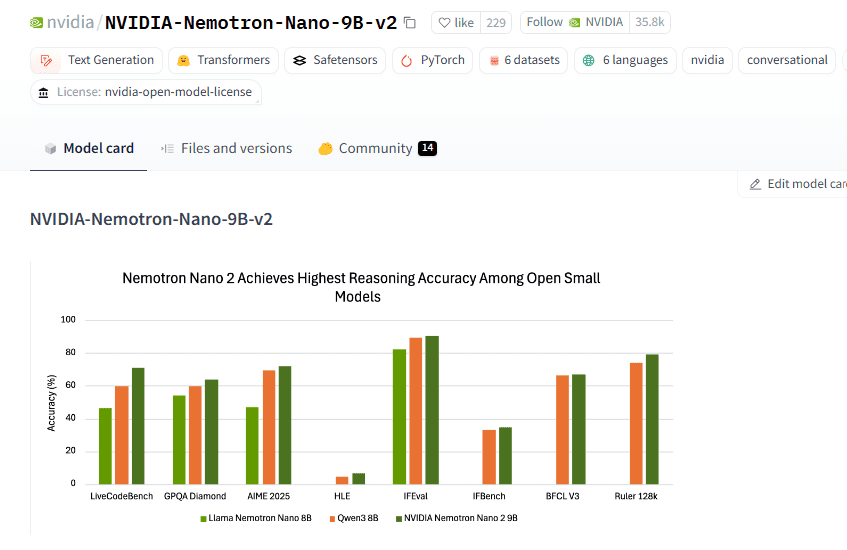
- Model Name and Developer: Nemotron-Nano-9B-v2, developed by NVIDIA.
- What It Does (The Simple Explanation): Think of Nemotron-Nano-9B-v2 as a hybrid athlete: it’s incredibly fast and smart. This model is designed to be a general-purpose AI that is optimized for speed. It has a special design that lets it perform complex reasoning tasks much faster than other models of a similar size, and you can even set a “thinking budget” to control how much time it spends on a problem.
- Real-World Use Cases: This model is perfect for applications where speed is everything, such as real-time conversational agents, automated customer support, and AI agents that need to make decisions in a fraction of a second.
- Benefits & Advantages: The key benefit is its hybrid architecture, which gives it a massive speed advantage without sacrificing accuracy. This makes it an excellent choice for building responsive and efficient AI applications, especially on NVIDIA’s powerful GPUs.
- Limitations & Things to Consider: While the model is optimized for NVIDIA hardware, its unique architecture and features mean that it’s primarily used within the NVIDIA ecosystem, and it may not be as accessible to developers using other types of hardware.
Comparison Table
| Model Name | Primary Use Case | Best for Beginners? | Key Benefit |
| Qwen-Image-Edit | Image & Text Editing | No | Powerful image manipulation |
| DeepSeek-V3.1-Base | Complex Reasoning | No | Specialized for problem-solving |
| Gemma-3-270m | Efficient On-Device AI | Yes | Small, fast, and versatile |
| Seed-OSS-36B-Instruct | Long-Form Analysis | No | Exceptional long-context handling |
| Nemotron-Nano-9B-v2 | High-Speed Reasoning | No | Blazing fast for its size |
How to Use Hugging Face: A Beginner’s Guide
Getting Started: Your First Steps
Creating Your Account Getting started with Hugging Face is as simple as creating a free account on their website (huggingface.co). Think of it like signing up for any social media platform – you provide an email, choose a username, and you’re ready to explore.
Navigating the Hub The Hugging Face Hub is like a vast marketplace of AI tools. Here’s what you’ll find:
- Models: These are the AI “brains” trained to perform specific tasks like translating languages, answering questions, or generating images
- Datasets: Collections of information used to train AI models (like millions of book pages for language models)
- Spaces: Interactive demos where you can try models directly in your web browser without any setup
- Documentation: Step-by-step guides explaining how each model works
Understanding Model Cards Every model comes with a “model card” – think of it as a user manual that explains:
- What the model does (its purpose)
- How well it performs (its accuracy rates)
- What languages or types of data it works with
- Any limitations or biases to be aware of
- Examples of how to use it
Basic Requirements To use most Hugging Face models, you’ll need:
- A computer with internet access
- Python programming language installed (it’s free and easier than you might think)
- The Hugging Face “transformers” library (a collection of tools that makes using AI models simple)
Implementation Methods: Different Ways to Use AI Models
Web Interface: The Easiest Way The simplest way to try Hugging Face models is through their web interface:
Spaces: Interactive web pages where you can type text, upload images, or provide other inputs to see what the AI can do. No coding required – just point, click, and explore.
Image: A sample spaces section on a hugging face models page
How to use Spaces
The Quickest way to use Hugging Face is by Spaces. Let’s get started with an easy example.
Stable Diffusion 3.5 turns text descriptions into professional-quality images—like having an AI artist that paints anything you describe.
Step 1: Access the Space
- Go to https://huggingface.co/spaces
- Search: “stable diffusion 3.5”
- Click: “stabilityai/stable-diffusion-3.5-large”
Direct link: https://huggingface.co/spaces/stabilityai/stable-diffusion-3.5-large
Step 2: Interface Overview
- Prompt Box: Describe your desired image. Example: “A golden retriever puppy sitting in a sunny meadow with wildflowers”
- Generate Button: Click to create your image
- Output Area: Your generated image appears here with download options
Results:
- Processing: 15-45 seconds
- Output: Professional photo-quality image matching your description
What is the Inference API?
Think of it as “AI-as-a-Service”—send your data to Hugging Face’s servers, get AI results back instantly. No downloads, no setup, access to 150,000+ AI models for text, images, translation, and more.
Inference API is a way to send data to models through the web and get results back, perfect for integrating AI into websites or apps.
Quick Start
Install:
Use:
Popular Uses
- Content Creation: Generate text, images, social media posts
- Business: Automate customer service, analyze feedback
- Translation: Convert text between 100+ languages
- Analysis: Extract insights from documents and images
Pricing
- Free: Thousands of requests per month
- Paid: Starts at $9/month for higher limits
- Token: Get from huggingface.co for better access
Key Benefits
- No technical setup required
- Always updated models
- Start free, scale as needed
- Works with any programming language
Get Started: Visit https://huggingface.co → Create account → Copy your API token → Start building!
Python Programming: For More Control If you want to incorporate AI into your own projects, you’ll use Python code. Here’s a simple example:
This code creates an AI that can determine if text expresses positive or negative emotions.
Command-Line Interface: For Advanced Users Tech-savvy users can interact with models through text commands on their computer, allowing for batch processing and automation.
Framework Integration: For Developers Hugging Face models work seamlessly with popular AI development frameworks:
- PyTorch: Facebook’s AI development platform
- TensorFlow: Google’s AI development platform
- JAX: Google’s newer, faster AI platform
Best Practices: Getting the Most from Hugging Face
Choosing the Right Model With over a million models available, selection can be overwhelming. Consider these factors:
- Task Match: Choose models specifically designed for your needs (translation, question-answering, image recognition, etc.)
- Language Support: Ensure the model works with your target languages
- Size vs. Performance: Larger models are typically more accurate but require more computing power
- Popularity: Models with more downloads often have better community support and documentation
- Recency: Newer models often incorporate the latest AI advances
Performance Optimization Tips
- Start with smaller, faster models for testing before moving to larger, more powerful ones
- Use model versions optimized for your specific use case (mobile-friendly, CPU-optimized, etc.)
- Consider using model distillation – smaller models trained to mimic larger ones
- Batch multiple requests together when possible for better efficiency
Licensing and Legal Considerations Different models have different usage terms:
- Commercial Use: Some models allow business use, others are research-only
- Attribution: Some require crediting the original creators
- Data Privacy: Understand where your data goes when using online APIs
- Export Restrictions: Some models have geographic usage limitations
Community Engagement
- Read user reviews and comments on model pages
- Contribute to discussions and share your experiences
- Report issues or suggest improvements
- Follow model creators for updates and new releases
By following these guidelines, even complete beginners can start leveraging the power of AI through Hugging Face, transforming what once required expert knowledge into accessible, practical tools for everyone.
Frequently asked questions
What is Hugging Face?
Hugging Face is the world's largest library for artificial intelligence tools, containing powerful AI models for various tasks.
What are the benefits of using Hugging Face models?
Hugging Face models provide pre-trained tools that make AI accessible, allowing developers to integrate AI capabilities easily into applications.