
Free software can now run a working AI agent on one laptop with no API bill. The machine’s memory, its settings and its number of users decide how far that gets you.
A research agent with no meter running
On October 24, 2026, developer Martín Castro Álvarez published a research agent whose default setup uses no paid model APIs. His open-source project, langgraph-parallel-agents, runs its AI model on the developer’s own machine.
That breaks the usual pattern. A model reads a question and generates a reply. With cloud inference, an application sends requests to a provider and pays according to the provider’s pricing model.
Castro Álvarez used Ollama instead. Ollama is free software that downloads a model and runs it on your own computer, and his default setup also searches a local index of documents in place of a hosted search service.
So what happens when you run the model yourself?
Projects published in October 2026 give a usable answer. One person can run a working agent with no API bill, as long as the setup respects three limits: memory, settings and the number of people using it.
How the $0 stack fits together
The agent stacks free parts. LangGraph, an open-source framework that manages the steps an AI agent takes, does the planning. A small open model called qwen3:4b does the reading and writing, and Ollama runs that model.
The workflow breaks one big question into smaller ones. A planner writes the sub-questions. LangGraph hands each one to a separate researcher branch running in parallel, each branch searches the local documents and summarises what it found, a reducer merges the findings, and a final step writes the answer.
The project also builds in retries, timeouts, a cap on how many branches run at once, and a filter on citations. If one branch fails, the others carry on.
Running the model to produce an answer is called inference, and here it happens close to home. Ollama runs a small web server on the computer itself, usually at localhost:11434, and applications send their prompts there. Replies come back in a format compatible with OpenAI’s, and Ollama’s documentation says local prompts and answers are not visible to the company.
That is the strongest case for going local. A developer can build a multi-step agent with no API key, no per-request charge and no prompt leaving the machine.

The agent divides one question among parallel research branches, then merges their findings into a single cited response.
Where the free part ends
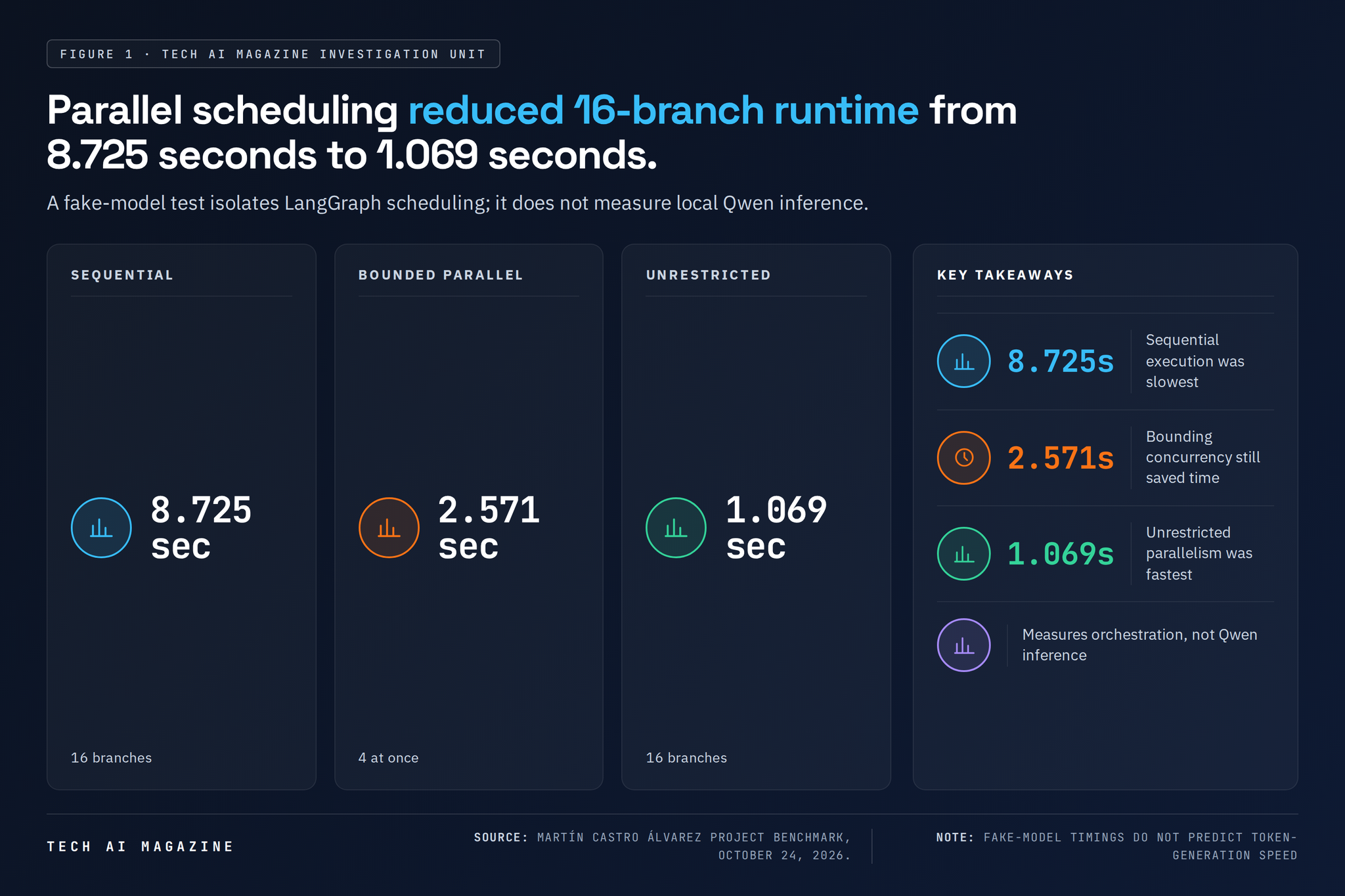
The speed figures in the project need careful reading. Castro Álvarez timed the workflow with a fake model standing in for the real one, so the test measures only how LangGraph schedules the work.
In that test, 16 branches took 8.725 seconds run one after another and 1.069 seconds with no limit on parallel work. Capping it at four branches at a time took 2.571 seconds.
Those numbers describe the plumbing. The project’s own benchmark warns that real speed depends on Ollama’s serving limits and on how well the graphics card shares its effort among simultaneous requests.
The money needs the same care. Someone still pays for the computer, the electricity, the storage, the model downloads and the engineering hours. Local inference removes the per-request bill and moves the rest onto the owner’s books.
The memory wall
VRAM sets the first hard limit. VRAM is the memory built into a graphics card, and a model runs fastest when it fits there completely.
Ollama’s quick-start guide, dated October 27, 2026, uses a model called Gemma 4 E2B as its example. The download is about 7.2 GB, and Ollama recommends 8 GB of available VRAM or unified memory (the shared pool some laptops use for both processor and graphics). With less, Ollama leans on ordinary system memory, and responses may be slower.
That gap between running and running well is easy to miss. Ollama reports whether a model sits fully on the graphics card, fully in system memory or split between the two. A split model still works, but moving data between the two kinds of memory cuts throughput.
Two models make it harder.
When several models are loaded on graphics cards, each must fit completely in available VRAM to load at the same time. If one doesn’t fit, Ollama unloads models or makes requests wait until memory frees up.
So the same application can feel quick on one workstation and crawl on another. Software meant for varied hardware needs a selection step that checks free memory, picks a model or a quantised version (a compressed copy that uses less memory) that fits, and falls back to a smaller model or the main processor when nothing does.
Compression has a price. Ollama documents lower-precision memory options that save space but can hurt answer quality, especially for some model families and at longer context sizes.
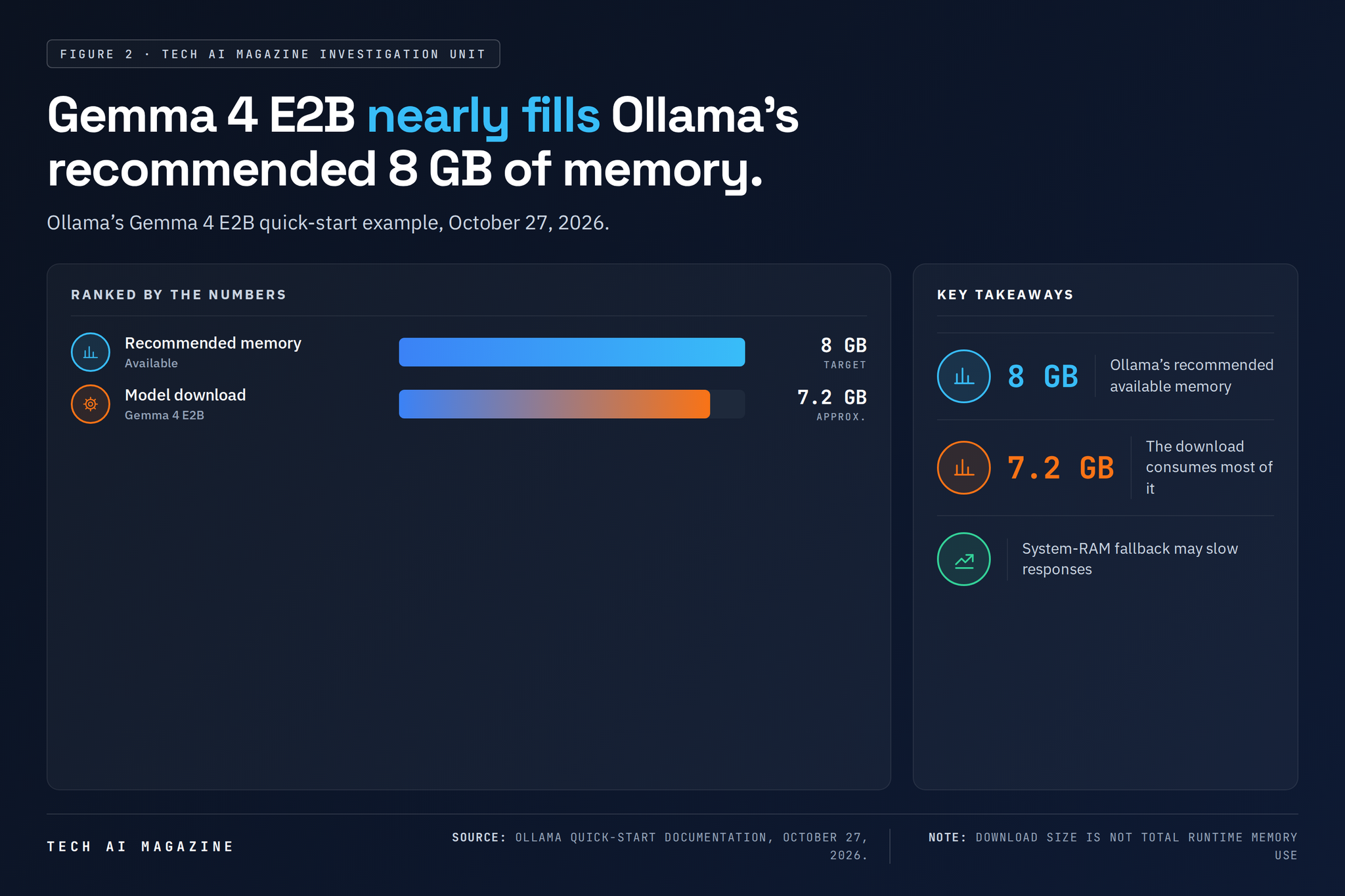
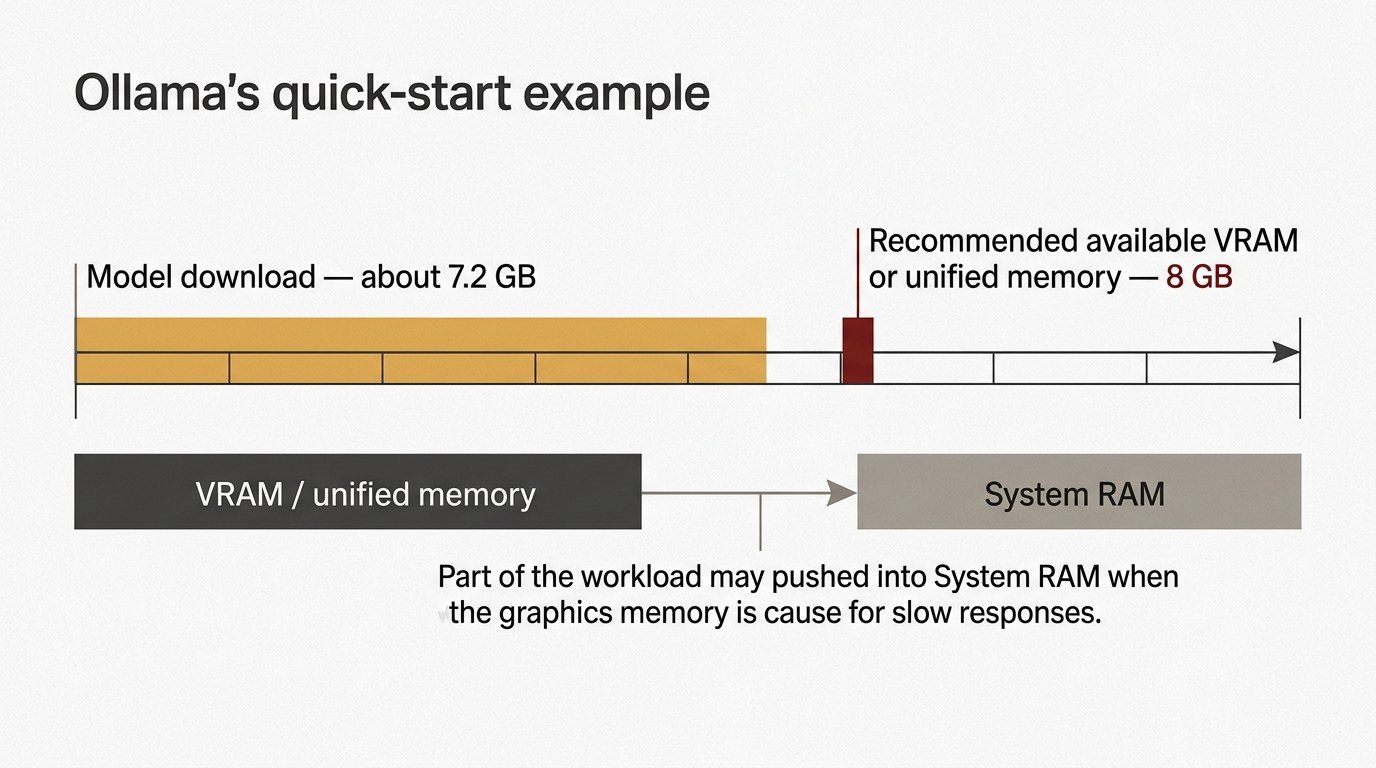
Ollama’s quick-start guide pairs a roughly 7.2 GB Gemma 4 E2B download with a recommendation for 8 GB of available VRAM or unified memory.
When the same model gets dumber
Settings are the second trap.
Two dials matter most. The context window is how much text the model can hold in view at once. Temperature is one of the model’s sampling settings.
Ollama’s own documents give two context defaults. Its FAQ says the server defaults to 4,096 tokens, while the reference for Modelfiles (small text files that configure a model) lists 2,048, along with a temperature of 0.8. The same reference sets defaults for other sampling dials and for maximum reply length.
A local model’s behaviour, then, depends on more than the model itself. The template that formats the conversation, the system prompt, the context limit and the sampling settings all shape the answer.
That explains a common complaint about local models looking weaker than the cloud version. If your local runner quietly uses a shorter context window, a different temperature or a different chat template, the comparison is broken before the first prompt.
The fix is to set everything on purpose. A developer can set the OLLAMA_CONTEXT_LENGTH variable, pass num_ctx through the API, or write a Modelfile with lines such as temperature 0.7 and num_ctx 4096. Bigger windows eat memory, because a longer context enlarges the cache the model keeps while it works.
One user is easy; a crowd is not
The strongest case against swapping a cloud API for a laptop comes from Ollama’s own documentation, updated October 26 and 27, 2026.
Ollama handles several requests at once only when enough memory is free. If another model can’t fit, requests join a queue, and once that queue passes its maximum the server returns an overload error. Each parallel request also needs its own context memory.
The defaults are modest. Ollama allows one parallel request per model and a queue of 512 requests unless the operator changes them. That queue length is a software setting, with no promise that a laptop can usefully answer 512 requests.
Sharing the machine adds chores. Ollama listens only to its own computer by default, and putting it behind a network proxy for colleagues hands you authentication, access control and protection against floods of traffic, the work a hosted API normally does for its customers.
Idle time has a setting too. Ollama keeps a model in memory for five minutes after each request unless you change keep_alive, which trims startup delay but ties up memory.
Eventually demand outgrows one machine. The architecture then needs a dedicated inference server, more graphics cards, a router that sends some requests to the cloud, or a cloud provider outright.
Teaching a model on a laptop
Some teams want to fine-tune a model, which means extra training on their own data so it handles their tasks better.
Soup, an open-source tool maintained by Alpamys Makazhan and contributors, released version 0.77.1 on October 28, 2026. It uses a YAML-driven workflow for fine-tuning, evaluation and serving, then exports results in formats usable by Ollama or llama.cpp.
Its trick is to leave most of the model alone. With QLoRA, Soup compresses the base model and freezes it, then trains small add-on weights called adapters. The YAML file names the base model, the data, the number of passes, the learning rate, batch size, adapter rank and compression, and Soup handles batching and hardware detection.
The project’s hardware guide pegs 8 GB of VRAM as enough for a model of roughly 7 billion parameters, 16 GB for roughly 14 billion and 24 GB for roughly 34 billion, all with 4-bit QLoRA. Sequence length, batch size, optimiser and model design can shift those requirements.
The boldest claim comes from a beta mode called layer streaming. Soup reports training adapters for an 8-billion-parameter Llama model on an RTX 3050 laptop graphics card with 4 GB of VRAM. It keeps the frozen base model out of VRAM and streams its layers through the card in turn.
Soup’s documentation also records a sharp warning. An earlier version of layer streaming produced normal-looking loss curves while computing wrong gradients for some larger layers, a defect the project says it repaired. Check any adapter against a baseline trained with the model held fully in memory before you trust it.
These are the project’s own measurements, and Soup notes that some performance rows aren’t comparable because clock rates and software versions changed between runs. Full retraining remains far more memory-hungry, and Soup blocks configurations it doesn’t support.
The verdict
Local inference wins when the work is private, predictable and used by one person or a handful, and the model fits comfortably in memory. Cloud inference stays simpler when you need large models, many simultaneous users or someone else running the servers.
Run this checklist before you commit to either.
- Measure the real workload. Write down prompt length, reply length, tools, retrieved documents, target response time and simultaneous users.
- Count memory in full. Add weights, runtime overhead, context cache and concurrency, then compare the total with free VRAM on your weakest machine.
- Pin every setting. Fix the model tag, compression level, chat template, temperature, context window, stop sequences and reply limit in a Modelfile.
- Benchmark with the real model. Run your own prompts through actual inference, because fake-model tests only time the plumbing.
- Plan for overload. Set queue limits, timeouts and a fallback path before a second user connects.
- Price the whole stack. Put hardware, power, maintenance, monitoring and staff hours beside the cloud token bill.
Back to the research agent
Castro Álvarez’s repository holds the promise and the limits together. The agent plans, searches, cites and pays no API fees, and its own benchmark still hands real speed to the model server and the graphics card.
If you are weighing the switch, three things follow. Pitch it as no hosted API spend, with the hardware and hours listed beside it. Set context and temperature yourself, then run identical prompts locally and in the cloud.
And if demand exceeds the GPU’s throughput, budget for a server, a router or a cloud account.
References
- Ollama FAQ — https://docs.ollama.com/faq
- Soup: fine-tuning workflow repository — https://github.com/Hitesh-XS/Soup
- Ollama Quickstart — https://docs.ollama.com/quickstart
- langgraph-parallel-agents, Martín Castro Álvarez — https://github.com/MartinCastroAlvarez/langgraph-parallel-agents
- Ollama Modelfile reference — https://docs.ollama.com/modelfile