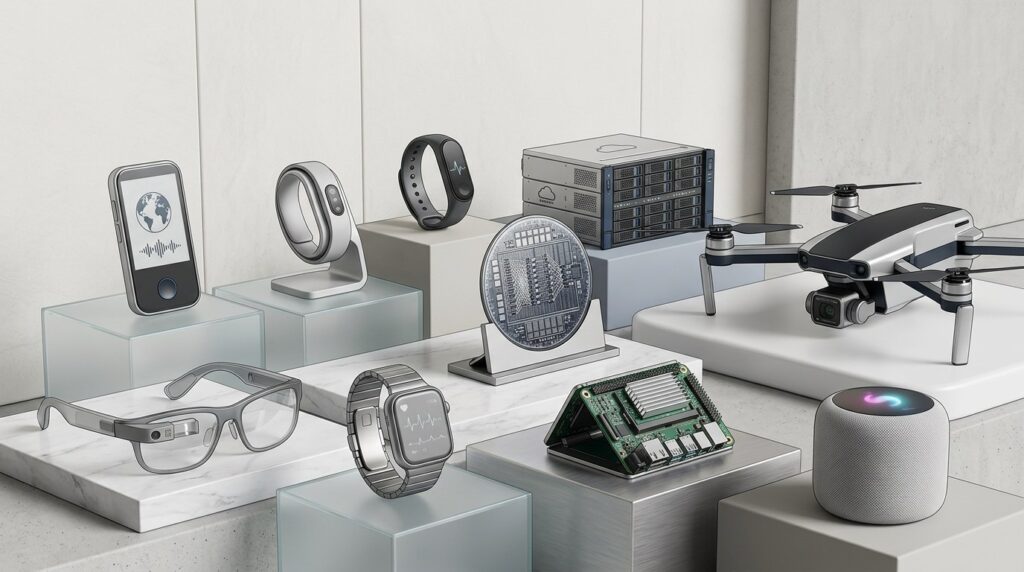

AI gadgets are moving beyond novelty into everyday utility. This guide helps buyers understand what’s worth using, what’s hype, and how AI-powered devices fit into real-world use cases.
-
Executive Summary
Executive Summary
-
AI gadgets
AI gadgets
-
Individuals and Small Teams
Individuals and Small Teams
-
Adoption Journey
Adoption Journey
-
Technical Skills
Technical Skills
-
Model Strategy
Model Strategy
-
Evolution
Evolution
Learning Objectives
After reading this article you will be able to:
Who This Is For (and Who It’s Not)
The Core Idea Explained Simply
Common Misconceptions
Practical Use Cases That You Should Know
How Organizations Are Using This Today
What Good Looks Like (Success Signals)
What to Avoid (Executive Pitfalls)
Final Takeaway
TL;DR — Executive Summary
AI gadgets and smart devices have moved beyond simple demonstrations into practical computing layers. From 2024 to 2026, mainstream integrations will drive most impact. These devices embed AI in everyday hardware without drawing attention to it.
Key categories include AI-enhanced phones, PCs, watches, rings, smart speakers, TVs, cameras, and appliances. Early AI wearables like pins, smart glasses, and mixed-reality headsets remain experimental and limited in reach.
Real benefits emerge in targeted areas. On-device assistants simplify voice, vision, and notifications. Health tracking gains context and personalization. Home automation handles security, energy, and tasks. Enterprises use edge AI in cameras, sensors, and devices for local data analysis.
A gap exists between hype and reality. Many launches falter on usability, battery, and integration issues. Successful ones blend into platforms like iPhone, Android, Windows, or smart homes, avoiding isolated hardware.
Buyers and executives should focus on use cases over devices. Prioritize ecosystem fit, interoperability, privacy, and support. Begin with established categories like phones, PCs, wearables, cameras, and sensors. Build expertise in on-device AI, edge machine learning, and device management, beyond just cloud tools.
Who This Is For (and Who It’s Not)
Who This Is For
This guide targets individual and small-business buyers. Tech-savvy professionals use it to decide on worthwhile AI gadgets. Power users assess upgrades like AI PCs, phones, glasses, or smart homes.
Enterprise and public-sector leaders find guidance for edge AI pilots. CIOs and CTOs plan deployments of cameras, sensors, or enhanced devices. Operations, facilities, security, and manufacturing heads explore monitoring, automation, and safety tools.
Product and innovation teams build on commodity devices like phones, wearables, and cameras. Startups weigh proprietary hardware against existing ecosystems.
Risk, security, and privacy specialists evaluate data-heavy gadgets. CISOs, data officers, and compliance teams handle audio, video, location, biometrics, and behavior data.
Who This Is Not For
This guide skips low-level hardware engineering details. It does not cover processor design specifics.
Gadget reviewers looking for spec comparisons or benchmarks will not find in-depth analysis here.
Robotics experts focused solely on industrial robots or autonomous vehicles get limited coverage.
The emphasis stays on strategic, practical choices for buying and deploying devices.
The Core Idea Explained Simply
AI gadgets refer to devices that process intelligence locally. They run compact AI models on the hardware itself, sometimes with cloud support for complex tasks.
These devices handle voice interactions through listening and speaking capabilities. Cameras and glasses interpret visual input from the environment. Wearables and sensors monitor body or surroundings like thermostats and air quality units. Automation features allow actions such as controlling locks, lights, or industrial controllers.
Key shifts from traditional smart devices include dedicated AI hardware. Neural processing units, or NPUs, in phones, PCs, and gadgets enable local generative and recognition tasks. Advanced models support natural language, multimodal inputs, and contextual decisions.
Devices now operate with greater independence. They go beyond scripted responses to categorize camera events or summarize notifications proactively.
In daily use, an AI phone manages calls, messages, and photos efficiently. An AI PC assists with email drafting, document summaries, and natural language file searches. Wearables provide timely health nudges based on tracking data.
Smart speakers and connected gadgets respond to voice commands and adjust environments. They also monitor homes for security. In factories or offices, edge AI on cameras and sensors spots issues in real time.
Most value comes from enhancing familiar device types. Phones, PCs, wearables, and cameras deliver the bulk of benefits. Add new devices only for specific, well-defined roles.
1. Key Consumer Categories
AI Smartphones
Modern AI smartphones feature powerful NPUs and integrated AI tools. Examples include Samsung Galaxy AI, Google Pixel on-device processing, and Apple’s machine learning stack.
Photo and video functions now handle real-time edits like object removal and low-light corrections. Background blurring and enhancements occur locally for speed.
Communication tools screen calls, provide live translations, and generate smart replies. Message summarization saves time on long threads.
The phone serves as the primary AI hub in practice. Many dedicated gadgets duplicate these features but with inferior interfaces.
AI PCs (Copilot‑style PCs)
AI PCs include laptops and desktops equipped with NPUs and operating system AI features. Windows Copilot+ PCs exemplify this integration.
These systems perform local transcription and summarization for meetings. Natural language searches span documents and emails.
On-device capabilities extend to image editing, noise reduction, and basic generative work. Knowledge workers see steady productivity gains from these tools.
Such upgrades build on existing workflows without major overhauls.
Wearables: Watches, Rings, Fitness Bands
Wearables track heart rate, variability, sleep patterns, movement, and temperature. AI algorithms score readiness, stress, and recovery levels.
Devices deliver intelligent notifications and personalized coaching tips. Trends shift toward predictive insights beyond basic metrics.
Rings offer discreet alternatives for users avoiding bulkier watches. These focus on comfort during continuous wear.
Smart Speakers and Home Hubs
Devices like Amazon Echo, Google Nest, and Apple HomePod act as central hubs. They handle voice queries, timers, calls, and media playback.
Users control connected items such as lights, locks, thermostats, and audio systems. Multi-room setups enable announcements and synchronized sound.
Recent advances tie in large language models for smoother interactions. Conversations feel more natural with improved follow-up handling. Automation routines become richer and more adaptive.
Smart Glasses and Mixed Reality
Ray-Ban Meta glasses support hands-free capture of photos and videos. They deliver audio augmented reality for notifications and voice assistance.
Apple Vision Pro introduces immersive displays for spatial computing in work and entertainment. These tools overlay digital elements on the real world.
Current adoption centers on early users in niche applications. Field work benefits from documentation without hands. Accessibility improves through visual aids. Support scenarios gain from remote guidance.
Experimental AI Pins and Wearables
The Humane AI Pin aims for screenless assistance worn on the body. Rabbit R1 pursued similar always-on, multimodal interaction, though its availability has shifted.
These designs intend constant listening and visual response without a full phone. They target quick, contextual help via gestures or voice.
Early feedback points to battery limitations and reliability gaps. Network latency often disrupts flow. Much functionality overlaps with smartphone apps.
Form and integration prove as critical as the AI core. Ecosystem ties enhance usability over isolated hardware.
2. Key Enterprise / Industrial Categories
Edge AI Cameras and Sensors
Edge AI cameras detect security events like intrusions or loitering. In retail, they analyze foot traffic, heatmaps, and shelf stock.
Manufacturing uses them for quality assurance, spotting defects on assembly lines. Hardware often includes built-in accelerators for on-site processing.
Industrial PCs or modules pair with sensors for broader monitoring. NVIDIA’s Jetson series provides compact, powerful options for these setups.
Processing at the edge cuts latency and bandwidth needs. It also preserves privacy by keeping sensitive data local.
Industrial Devices and Appliances
Smart PLCs incorporate machine learning for control decisions. AI-enhanced robots and drones handle inspections in harsh environments.
Logistics systems use predictive maintenance on conveyors, pickers, and packaging. These detect failures before they halt operations.
Embedded AI enables real-time adjustments in dynamic settings. Integration with factory networks streamlines oversight.
Specialized Edge Accelerators
Google’s Coral Edge TPU runs neural networks on low-power hardware. Intel’s Movidius units focus on vision tasks in embedded systems.
NVIDIA’s Jetson modules support detection, classification, and lightweight generation. These accelerators fit resource-limited deployments.
They optimize for efficiency in cameras, sensors, and controllers. Local processing reduces reliance on distant servers.
3. Under the Hood: On‑Device and Edge AI
Model compression techniques shrink large AI networks for device use. Quantization reduces precision to fit memory and speed constraints.
Multimodal fusion combines inputs from audio, video, and sensors into unified models. This enables richer environmental understanding.
Hardware like NPUs handles matrix operations with minimal energy draw. They tailor to inference tasks common in edge scenarios.
Hybrid setups process routine work on-device for speed and privacy. Clouds manage heavy lifting or multi-device coordination.
Devices emphasizing local AI often respond quicker and protect data better. Clear vendor claims on on-device features signal reliability.
Cloud-dependent gadgets may excel initially with vast models. Yet they risk disruptions from connectivity or service changes.
Common Misconceptions
“All AI Gadgets Are the Future; We Need to Try Everything”
Not every AI gadget delivers lasting value. Core categories like phones, PCs, wearables, cameras, speakers, and sensors capture most practical gains today.
Niche devices often mirror phone or speaker functions. They introduce extra setup like chargers and apps without unique benefits.
Focus on proven tools avoids scattered efforts.
“Standalone AI Hardware Will Replace Smartphones”
Efforts to supplant phones with pins or pendants face hardware hurdles. Battery life, connectivity, heat, and delays limit viability.
Phones offer unmatched versatility and ease in daily tasks. Standalone options rarely match this breadth.
Augmentation remains the practical path forward. Phones will stay central hubs for the foreseeable future.
“More AI Means Better Device”
Pushing aggressive AI features can strain batteries quickly. It risks errors like hallucinations or unwanted automations.
Privacy issues arise from constant processing. Balance favors steady performance in focused roles.
Ecosystem compatibility and user controls outweigh raw AI power. Explainable actions build trust.
“AI Gadgets Are Mostly Toys for Consumers”
Consumer devices draw headlines, but enterprise edge uses yield strong returns. Safety monitoring prevents accidents effectively.
Equipment diagnostics cut unplanned outages. Logistics optimizations streamline warehouses.
Incremental sensor and camera upgrades often outperform flashy consumer bets. They tie directly to operational goals.
“It’s Safe to Deploy Any Smart Device; Vendors Handle Security”
Smart devices expand risks through microphones, cameras, and networks. Data on locations, biometrics, and videos becomes vulnerable.
Budget options frequently skip ongoing updates. Security basics may fall short.
Inventories track all deployments. Segment networks to isolate threats. Assess vendors for risks, regardless of scale.
Practical Use Cases That You Should Know
For Individuals and Small Teams
1. Personal Productivity and Focus
AI phones and PCs filter notifications by priority. They summarize emails to highlight key points. Meetings get transcribed and noted automatically.
Smart speakers manage hands-free tasks like timers and lists. Glasses capture photos or notes during mobile work.
Stick to your current ecosystem like Apple, Google, Microsoft, or Amazon. This minimizes integration hassles over standalone additions.
2. Health, Fitness, and Wellbeing
Wearables analyze sleep for actionable insights. They coach based on activity and heart data. Unified views combine inputs from scales and trackers.
Verify compatibility with health platforms from doctors or insurers. This ensures data flows into supported wellness systems.
3. Home Security and Energy
Cameras identify people, packages, or vehicles accurately. Thermostats learn routines to optimize heating and power. Plugs adjust usage for efficiency.
AI refines alerts to reduce false alarms from motion. Local processing options enhance privacy. Strong encryption protects streams.
For Organizations
4. Facility Security and Safety Monitoring
Edge cameras spot intruders or odd behaviors in spaces. They flag restricted zone access or PPE lapses.
Industrial setups monitor for unsafe actions. Integration links to alarms and dashboards.
Proven tasks involve straightforward detections. Tie them to existing controls for quick wins.
5. Predictive Maintenance and Operations
Sensors on vibrations or sounds catch early equipment issues. They signal wear or misalignments before failures.
Energy meters detect usage anomalies. This highlights inefficiencies in real time.
Benefits include less downtime and longer asset life. Energy savings follow from targeted fixes.
6. Retail and Customer Experience
Cameras track traffic and linger times for layout insights. They alert on empty shelves or stock errors.
Kiosks and signs adapt displays to crowds or promotions. In-store AI guides queries and navigation.
These tools refine operations without heavy overhauls.
7. Field Service and Remote Assistance
Glasses stream technician views to experts remotely. Overlays provide step-by-step instructions.
AI identifies components during repairs. Reports generate automatically from sessions.
This speeds resolutions in dispersed teams.
8. Office and Knowledge Work Support
AI PCs summarize documents and draft content locally. They handle routine cognitive loads.
Meeting rooms use smart cams to frame speakers. Microphones transcribe and recap discussions.
Sensors analyze desk usage for space planning. Hot-desking improves through data patterns.
How Organizations Are Using This Today
Common Adoption Pattern
Begin by leveraging current assets. Refresh to AI-enabled phones and PCs during standard cycles. Enable secure features in tools like collaboration platforms, guided by policies.
Test in focused areas next. Deploy security cameras in one site. Add sensors to key production lines. Introduce remote aids for field teams.
Set up governance early. Track all smart devices in a central register. Define ownership for configs, data, and responses.
Expand through reusable setups. Create patterns like smart docks or meeting rooms. Standardize vendors and processes across sites.
Sector‑Specific Patterns
Manufacturing deploys edge cameras on lines and warehouses. Sensors monitor docks for logistics flow. Robots assist in goods movement.
Retail installs smart shelves and kiosks for inventory. Cameras aid customer flow. AI supports staff and guests.
Healthcare uses monitors for vitals and beds. Wearables enable remote patient checks under privacy rules.
Offices equip meeting areas with smart tech. Sensors track air, occupancy, and energy for optimization.
Successful groups view devices as interconnected system elements.
Talent, Skills, and Capability Implications
Technical Skills
Edge machine learning involves deploying lightweight models. Tools like TensorFlow Lite or ONNX handle device constraints. Consider limits on CPU, GPU, NPU, memory, and power.
Integration links hardware SDKs to back ends. Jetson or camera APIs connect devices to data platforms.
Network engineering secures IoT segments. Manage identities, certificates, and updates for resilience.
Data work aggregates device logs into analytics. Dashboards visualize events and build alerts.
Non‑Technical and Cross‑Functional Skills
Design focuses on workflow improvements via AI. Avoid overload from excessive notifications.
Privacy expertise covers data types like video and biometrics. Address consent in monitoring scenarios.
Change efforts train users on devices and data use. Ease fears around surveillance impacts.
New and Evolving Roles
Edge AI architects plan device selection and connectivity. They integrate cloud and on-premises flows.
Governance leads oversee inventories and policies. They handle lifecycles from setup to retirement.
Experience designers bridge hardware, software, and users. They ensure intuitive, trustworthy interactions.
Build, Buy, or Learn? Decision Framework
For AI gadgets, balance off-the-shelf hardware with services and internal growth. The goal integrates reliable components into operations.
1. Build vs. Buy Hardware
Opt to buy commodity items like phones, PCs, wearables, and sensors. Established vendors provide tested gear, supply, and security.
Ecosystems ensure OS updates and support. Customization trades off against these basics.
Build only for unique needs like medical or critical gear. Off-the-shelf options must fall short first.
Custom paths involve design, certification, and logistics costs. Support and regulations add ongoing loads.
2. Build vs. Buy Software Layer
Adopt platforms for smart environments. Apple Home or Google Home manage consumer setups. Enterprise IoT tools handle device and data flows.
Cloud providers offer ingestion and monitoring layers.
Build custom orchestration for tight business ties. Use it when privacy or analytics demand specialization.
3. Learn: Core Capabilities to Develop
Master device management across lifecycles. Onboard, update, and retire hardware securely.
Discover use cases from real issues like costs or downtime. Prototype small before broad rollout.
Assess risks through privacy reviews. Plan communications for workers and customers.
Learning drives strategy over hardware ownership.
What Good Looks Like (Success Signals)
Strategic and Organizational Signals
A solid strategy outlines targeted categories like cameras or wearables. It notes avoids for items like new pins.
Deployments link to problems such as theft or energy use. Metrics track reductions in incidents or savings.
Governance and Risk Signals
Inventories catalog devices by location, owner, and data. This enables oversight.
Policies define recording scopes, access, and retention. Controls enforce these rules.
Transparency informs staff and users on placements and purposes. Channels handle concerns directly.
Technical and Operational Signals
Dashboards monitor health, flows, and alert accuracy. They flag issues early.
Security includes patching and network isolation. Authentication strengthens access.
Impacts measure changes in incidents, costs, or times. Baseline comparisons guide adjustments.
Cultural Signals
Users engage devices confidently. Feedback targets fixes, not broad distrust.
Pilots capture lessons for policy tweaks. Deployments improve iteratively.
What to Avoid (Executive Pitfalls)
1. Gadget‑Chasing Without a Use Case
Purchasing trendy AI items based on buzz leads to idle hardware. Support and risks burden teams without gains.
Tie buys to defined needs from the start.
2. Ignoring Ecosystem Lock‑In
Combining disparate platforms fragments management. User experiences suffer from silos.
Standardize on few ecosystems. Favor open protocols for flexibility.
3. Underestimating Privacy and Worker Concerns
Silent rollouts of trackers breed resistance. Regulations and trust erode quickly.
Consult stakeholders early. Detail purposes, limits, and handling.
4. Skimping on Security
Unvetted devices on main networks create entry points. Exploits follow weak spots.
Use procurement checks and segmentation. Audit lifecycles routinely.
5. Scaling Too Fast
Broad deployments before proofs invite overload. Costs mount if reversals occur.
Phase expansions. Base growth on ROI and risk data.
How This Is Likely to Evolve
Looking toward 2026 and a bit beyond:
Consumer Side
AI integrates deeply into standard devices. Phones advance local summarization and personalization. PCs handle more translation on-device.
Wearables push proactive health nudges. Glasses improve on battery and apps for work or access.
Experimental gadgets consolidate. Startups shift to software or get absorbed. Ideas feed into platforms.
Enterprise and Industrial Side
Edge AI becomes routine in builds. Cameras and sensors embed models by default.
Cloud-edge links standardize updates and insights. They manage device fleets at scale.
Governance and Regulation
Surveillance features face closer review. Rules target biometrics and monitoring in spaces.
Security standards rise for updates and labeling. Compliance demands strengthen.
Plan devices as ongoing infrastructure. Policies will expand with capabilities.
Final Takeaway
AI gadgets evolve existing devices with local smarts and independence. They layer intelligence onto familiar hardware.
Solve problems through workflows first. Upgrade core types like phones, PCs, wearables, cameras, and sensors incrementally.
Develop edge AI, governance, and privacy skills. View deployments as system parts, not novelties.
Thoughtful integration yields efficiency and safety gains. It sidesteps hype-driven disappointments.
Related Articles
Get Tech AI Magazine Free for 3 Month
-
Access all issues of Tech AI Magazine -
Digital copy delivered monthly via email -
No credit card required
Frequently asked questions
What are AI gadgets?
AI gadgets refer to devices that process intelligence locally, handling voice interactions and monitoring environments.
Who is this guide intended for?
This guide targets individual and small-business buyers, tech-savvy professionals, and enterprise leaders exploring edge AI.
What should buyers prioritize when choosing AI gadgets?
Buyers should prioritize ecosystem fit, interoperability, privacy, and support over isolated hardware.